
The No-Code Marketplace Builder for Founders
Launch your own online marketplace - with payments, seller onboarding, and custom branding. No developers needed.
No coding required. Launch in days, not months.
Watch the Full Build
No-Code Marketplace Builder - Full Demo
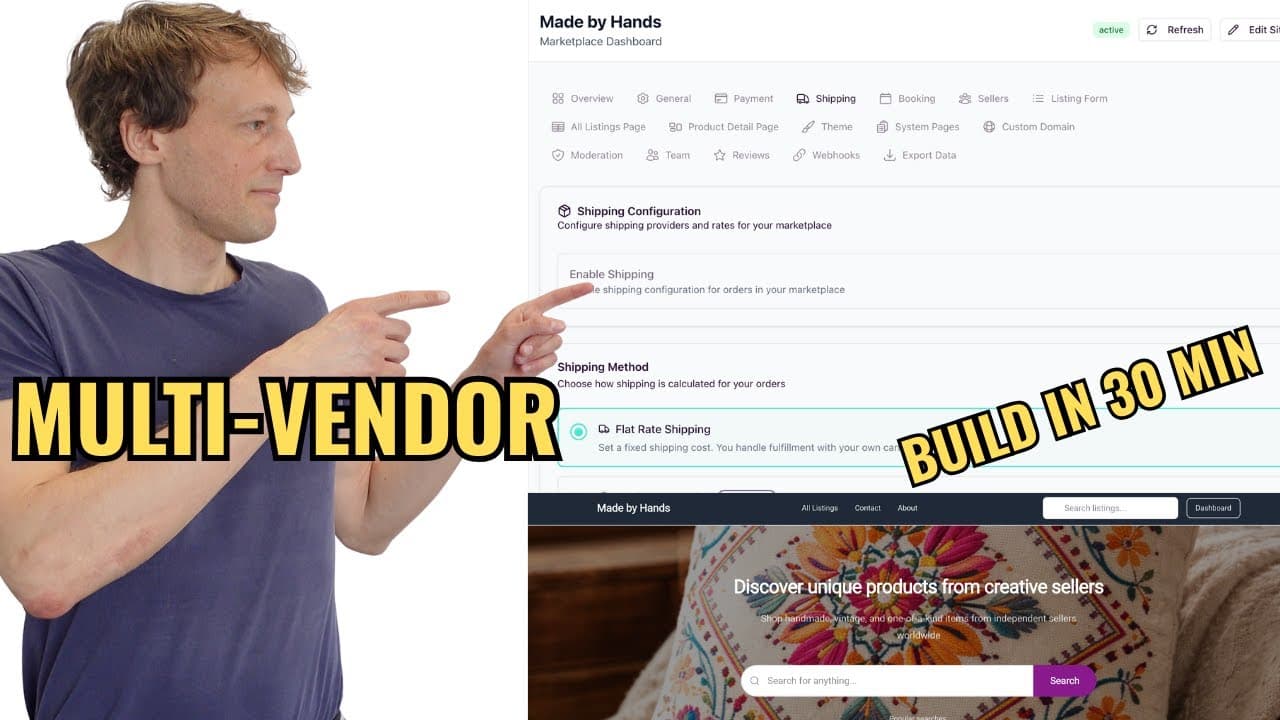
From zero to a live marketplace with payments, sellers, and shipping - in ~10 minutes
0:00
How to use the builder
3:16
Stripe Connect setup
6:11
Shipping configuration
7:52
Test purchase flow
Read the full video transcript▼
Introduction (0:00)
Building an online marketplace used to require a dev team, months of work, and thousands of dollars. Today I'm going to build one from scratch - no coding, just AI. By the end of this video you'll see a fully working marketplace with payments, seller onboarding, listings, and a real checkout. Let's go.
Why marketplaces are different (0:18)
Before we jump in: marketplaces are not normal websites. You don't just need pages - you need two-sided payments with Stripe Connect, seller dashboards, commission logic, payout tracking, and a lot of trust systems. No-code tools like Webflow and Bubble can design a nice front-end, but they can't handle marketplace logic properly. That's what a marketplace builder like Prometora does.
What we're building (0:40)
We're building a marketplace for local handmade crafts and home decor called Heart and Handmade. I'll set up a couple of listing types - tables and chairs - create a single listing, and wire up payments end-to-end so you can see the full flow.
Building the marketplace with AI (1:00)
In Prometora I pick "Custom with AI", paste in the marketplace idea, name it Heart and Handmade, and choose a "bold and modern" style. In a few seconds the first version is generated - hero, a "Why choose Heart and Handmade" section, FAQ, contact page, and About page are all filled in automatically. I swap the hero image, make it slightly bigger, and tweak the navigation to add links to All Listings, About, and Contact.
Stripe Connect setup (3:16)
Go to Store Settings → Payments. Enable purchase buttons, then click Stripe Connect - it asks for your publishable key and your secret key.
Open Stripe and switch to your test environment in the top-left corner, then go to Developers → Overview. Copy the publishable and secret keys and paste them into Prometora one by one, then save. Always start with test keys and only switch to live keys once everything is working end-to-end.
Scroll to the bottom of the payment settings to set your commission. I set it to 20% - so on a $100 sale, the marketplace earns $20.
Listing form and listing types (4:50)
Now to the listing form. We need two listing types: Tables and Chairs. Pricing model is fixed price (no free listings, no calendar, no location). I add one custom field - a Type of material dropdown with options Wood, Metal, Plastic, Other. Currency stays in USD and I require at least one image. Sellers can also attach a video if they want.
Shipping configuration (6:11)
Before making a listing I set up shipping. Enable shipping and enable the shopping cart so buyers can purchase from multiple sellers in one order, just like Amazon.
- Flat rate shipping: $50
- Free shipping above $500
- Countries: United States only
- Shipping deadline: 7 days - orders not shipped in time are auto-cancelled and refunded
- Buyer delivery confirmation enabled - confirmation email after 5 days, payout released after 10 days
Creating the first listing (7:00)
I sign up as a seller on my own marketplace (the only way to make a listing) and click Create a Listing. The two listing types I made show up - Tables and Chairs. I pick Tables, title it "Wooden beautiful table for sale", set the price to $300, pick Wood as the material, upload three photos, choose a primary image, and publish.
On the All Listings page I remove the default category I'm not using and toggle off the quantity selector in store settings, since this kind of marketplace doesn't really need it. The listing page now shows the image gallery, Buy Now, Add to Cart, and Message Seller.
Test purchase flow (7:52)
Now I sign up on a second account as a buyer (you can't buy your own listing). I add the table to cart - shipping shows $50 with an "add $200 more for free shipping" prompt. Total at checkout: $350. I fill in fake info and use Stripe's test card 4242 4242 4242 4242, then pay.
The order goes through. The buyer receives a confirmation email; the seller receives a "You made a sale" email with the breakdown:
- Product sales: $300
- Shipping: $50
- Platform fee (20%): -$60
- Stripe processing: -$9
- Seller earnings: $281 - held until shipped
Shipping and releasing payout (9:00)
On the seller dashboard I add a tracking number, pick UPS as the carrier, and mark the order as shipped. The dashboard shows "Payout held until buyer confirms delivery." The buyer gets a "Your order has been shipped" email with the tracking info. A few days later the buyer clicks Confirm Delivery - the payout is released to the seller automatically and the order is closed out.
Outro (10:00)
That's it - you can no-code your way to a fully working marketplace. If you have any questions, reach out. If you liked the video, subscribe and give it a like. See you in the next one.
What Is a No-Code Marketplace Builder?
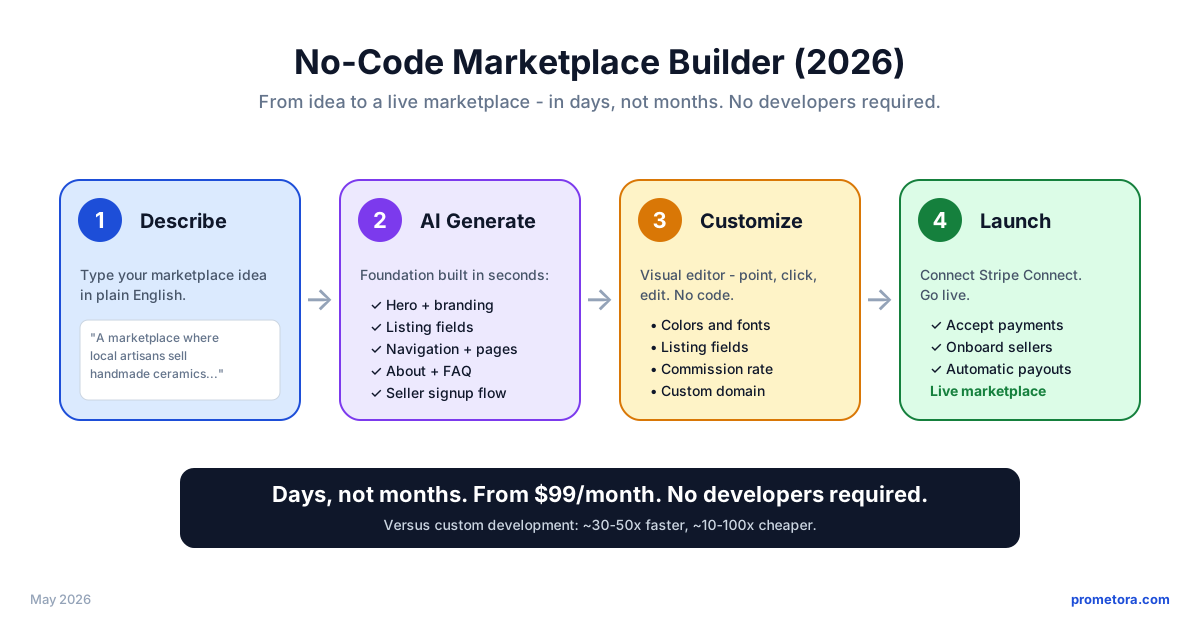
A no-code marketplace builder is a platform that lets you launch a multi-vendor marketplace - with payments, listings, seller onboarding, commission splits, and payouts - without writing a single line of code. You configure your marketplace through a visual editor (or, with newer tools like Prometora, by describing your idea in plain English) and the platform generates the working software around it.
and 3-12 months to first transaction - a runway most marketplace ideas can't survive.
live in days, not months, at SaaS pricing instead of agency rates.
Unlike general website builders (Wix, Webflow), marketplace-specific tools ship the multi-vendor flows out of the box:
The main platforms in the category:
The trade-off is less customization - a marketplace with truly unusual workflows no platform supports may still need custom development. But that's rare, and it's a question to answer after you have real users - not a reason to spend months and $10k+ building first.
Why Build Your Marketplace Without Code?
Custom marketplace development is expensive and slow. There's a better way.
Cost
Even three years of subscription is cheaper than one round of custom development.
Time
Every extra month burns runway and founder energy without the market signal only real users give you.
Risk
Most marketplace ideas fail before launch. No-code makes the cost of being wrong small.
The point isn't that no-code is the training wheels before "real" development - it's that the technical investment custom development front-loads is one you may never need to make. Marketplaces start on no-code to launch fast, and stay because the platform keeps scaling with them: more sellers, more transactions, more features - without a rebuild.
Step-by-step playbook
How to Build a Marketplace Without Code in 2026
Six concrete steps from idea to live marketplace - all without writing a line of code. Each step is something you can do today.
- 1
Pick a marketplace category and niche
Narrow beats broadDecide what kind of marketplace you're building: products (like Etsy), services (like Fiverr), rentals (like Airbnb), or B2B (like Faire). Then go narrow within that category. Generic platforms struggle - niche ones win. "Vintage furniture in Copenhagen" beats "a marketplace for everything".
- 2
Describe your idea to the AI builder
No blank canvasOn Prometora, you describe the marketplace you want and the AI generates the foundation - pages, structure, listings, and design - so you don't start from a blank canvas. Prefer not to start with AI? You can also pick one of the ready-made templates (general, rental, product, or service) and customize from there. Either way, you're not coding from scratch.
- 3
Customize branding and listing structure
No code, just clicksChange colors, fonts, layout, and hero copy in the visual editor. Configure what fields your listings need - photos, condition, pricing, location, calendar availability. This is where your marketplace stops feeling like a template and starts feeling like yours.
- 4
Connect Stripe Connect for payments
The hard part, made one clickThe hardest technical thing in any marketplace - splitting payments between sellers and your platform - is one click on a no-code builder. Add your Stripe keys, set your commission rate (usually 5-15%), and you're ready to take real payments. Sellers onboard themselves through Stripe.
- 5
Recruit your first 10 sellers (manually)
Do things that don't scaleEmpty marketplaces stay empty. Before you tell anyone about your platform, recruit 10 sellers personally. DM them, email them, help them list. Quality over quantity - 10 great listings sets the tone for whoever lists next.
- 6
Drive your first 10 transactions
Treat early buyers like VIPsShow up where your buyers hang out: subreddits, Facebook groups, Discord servers, niche directories - with genuine value, not link drops. Ask sellers to share their listings with their own audiences. The first 10 buyers' reviews are your social proof for the next 100.
Limitations of No-Code Marketplace Builders
Every build path trades something. Custom development trades months and $10k+ for control; no-code trades some control for speed. Here's the honest version of what you give up - and when it actually starts to matter.
Less flexibility than custom code
Unusual workflows (custom escrow rules, multi-stage approvals, industry-specific compliance) can hit walls on any no-code builder.
Almost no marketplace needs this on day one - and most never do. Marketplace-native builders ship the workflows marketplaces actually use, and keep shipping new ones. If your model truly needs something bespoke, you'll know it from real users, not guesses.
Your stack lives on the platform
Your data and configuration live on the builder's platform, and rebuilding on a different stack later is real work.
Data export is standard, so you're never trapped. And growing doesn't mean leaving: marketplaces run on platforms like Prometora from first sale to high-volume - pick a builder whose tiers are built to scale with you.
Costs scale with platform tiers
Subscription fees grow as you scale - more listings, more transactions, more advanced features.
Fees grow with usage, which means with revenue - you pay more when you earn more, instead of $10k+ up front before your first sale. Run your numbers in the calculator below.
You don't manage the infrastructure
You don't control the underlying servers - if the platform has a slow day, your marketplace has a slow day.
For most founders this is the point: hosting, security patches, and uptime are the platform's job, not yours. Custom infrastructure only pays off at very high traffic.
For most founders, this trade is clearly worth it: you launch in days instead of months - and you're not buying a starter tool. The same platform runs marketplaces from their first transaction to established, high-volume stores, with tiers that scale as you do.
Everything You Need to Build a Marketplace
Prometora includes all the features for a professional online marketplace.
AI-Powered Builder
Describe your marketplace idea and AI generates your store - listings, branding, and structure.
Learn moreStripe Connect Payments
Built-in payment processing with automatic seller payouts and configurable platform fees.
Learn moreSeller Onboarding
Sellers sign up, verify with Stripe, and start listing - no technical skills required.
Learn moreVisual Editor
Customize colors, fonts, layout, and branding without touching any code.
Learn moreCustom Domains
Connect your own domain for a fully branded marketplace experience.
Learn moreShipping & Cart
Multi-seller cart with per-seller shipping, tracking, and order management.
Learn moreTrusted by Marketplace Founders
See what our customers have to say about building their marketplaces with Prometora.
“Highly Customizable, Exceptional Support”
“I find Prometora incredibly intuitive and easy to structure, much like Lego blocks… I've tried many alternatives, but Prometora was the only one that didn't limit my vision. Additionally, the support from Rasmus and the Prometora Team is exceptional.”
Antoanella P.
Founder
“Comprehensive, Ever-Improving System with Excellent Support”
“It is a comprehensive system that is constantly being improved and new functionalities are added. And if you are missing a function, you can contact Prometora and ask them to develop it - and they are very responsive… Prometora takes care of everything a web developer would have done in our company, so we can do without that part.”
Torben M.
CEO
“User-Friendly Marketplace Builder with Super Helpful Support”
“It's an excellent, user-friendly tool for any beginner who wants to kickstart a marketplace website quickly and start testing an idea without worrying about the technical side of things… Prometora makes it possible for a complete beginner to launch a working, fully functional marketplace within a couple of weeks.”
Verified User
Non-Profit Organization Management
Reviews collected by and hosted on G2.com
Revenue Model
Calculate Your Marketplace Revenue
See how much you can earn from your marketplace. Set your commission rate and watch the numbers add up.
Net monthly revenue
$250
After Prometora's fee and subscription
Annual projection
$3,000
Net revenue at this volume × 12
Above break-even
42 orders
58 above, subscription covered
Your numbers
Where each sale goes
The buyer pays $50.00
Billed to you once a month with your subscription
Deducted from the seller, not from you · US card rate
Per sale, before your monthly subscription
Projections
Profit margin5.0% of GMV
Like the look of $250/month?
Start a free 14-day trial and turn this projection into a real marketplace.
As you grow
Net revenue per month at different order volumes, based on $50 AOV, 10% commission and the Professional plan
Monthly orders → net revenue per month
| Orders | GMV | Commission | Fees | Net |
|---|---|---|---|---|
| 50 | $2,500 | $250 | -$213 | $38 |
| 100You | $5,000 | $500 | -$250 | $250 |
| 250 | $12,500 | $1,250 | -$363 | $888 |
| 500 | $25,000 | $2,500 | -$550 | $1,950 |
| 1,000 | $50,000 | $5,000 | -$925 | $4,075 |
Frequently Asked Questions
• Prometora - AI-generated setup, visual editor, Stripe Connect built in. From $175/month.
• Sharetribe - template-based, larger community. Live plan $199/mo yearly or $259/mo monthly.
You can launch a fully functional marketplace - with payments, seller onboarding, and listings - without writing a single line of code. Custom development only makes sense if your marketplace has highly specialized workflows no platform supports.
• If you want fastest time to launch + AI-generated setup: Prometora (from $175/mo)
• If you want the most established platform with a large community: Sharetribe (Live plan $199/mo yearly or $259/mo monthly)
For a deeper feature-by-feature breakdown, see our marketplace software comparison.
Custom marketplace development typically costs $10,000 to $50,000+ and takes months of work. With a no-code marketplace builder, you get the same core features - payments, seller onboarding, listings - at a fraction of the cost.
No-code lets you validate your marketplace idea quickly, launch in days instead of months, and iterate based on real user feedback - without hiring a development team.
Learn more in our custom domain guide.
You set your own fee structure. Stripe handles compliance, fraud prevention, and payouts to sellers worldwide. Learn more in our revenue guide.
Sellers can even create listings and make sales before completing their full Stripe verification - earnings are tracked and paid out automatically once onboarding is complete.
Whether you're building a niche handmade goods shop, a freelance platform, a vacation rental site, or a wholesale marketplace - you can launch it without writing a single line of code.
The typical flow: describe your idea (1 day), customize branding and listing fields (1-2 days), connect Stripe Connect (under an hour), recruit your first sellers (the hard part - usually 1-2 weeks). Compare this to custom development which typically takes 3-6 months minimum.
Where any no-code platform can hit limits: extremely high traffic (millions of concurrent users) or genuinely unusual workflows that don't fit the marketplace model. For 99% of marketplace founders, no-code scales just fine.
If you ever decide to migrate to a different platform or custom code, your data (listings, users, transactions) is exportable. The migration is real work, but you're not locked in forever.
Related guides
Keep going
More videos and guides on building marketplaces from scratch.

Ready to Build Your Marketplace?
Turn your marketplace idea into reality - no coding, no developers, no months of waiting. Just your idea and Prometora.
14-day free trial. No charge until your trial ends.